What you should do before doing Forex trading?
At Home : Find the most suitable location
Do you want trading forex at your home? First of all you must find the best place to put your computer, use good and ergonomic desk and chair, use must enjoy sitting on the comfortable chair. If you can, find the place that far away from public area in your home, you can use separated room or on your own bedroom.
At Office : Check your office regulation
If you want trading forex at your office, you need to check your office regulation, because some of company do not allowed their employee doing other activity rather that office job, ask your Information System Manager, can you doing forex trading at your office computer during working hour? Or in lunch time only?
2. Prepare your Internet connection
Stable access
Online Forex Trading need stable and fast internet access, with dial-up internet access is enough but if you can find the faster internet access, find the internet service provider that can give fast and cheap internet access. And the most important is that internet access is not interrupted or disconnected often.
Calculate your expense and your income
Calculate your internet access fee, because in forex trading sometime you need to access hourly everyday to watching chart movement, you must get bigger income that your expense. Maybe in early training time you will get lot of expense before get big profit, so prepare your money.
3. Prepare you physic and mental
You must have healthy body
In Online Forex Trading you must have healthy and fit body, because sometime you will need to trading until late in the middle of the night, because Forex Trading is full 24 hours daily, rounding on each country trading time zone.
Ready to get loss
The most important is your mental, because in Forex Trading you can't always profit, sometime you will be loss, so prepare your mind and don't be angry and depressed. Be safe in playing Forex, don't be greedy and want to get big profit in fast time. Allocate little percentage of your deposit to get little profit, after several times you will get big profit.
Forex is not same as HYIP
If you usually playing HYIP before such as Autosurf, PTC, PTR etc, so you must understand Forex Trading is not same as HYIP, if on HYIP you can get money by allocated it on HYIP website and get profit instantly, then in Forex Trading you must manage your money by yourself, you must be practicing before become expert in Forex Trading, studying much of Forex Literature and article on many website, even you must buy some forex book to expand your skill.
Don't be easy to surrender
Maybe in training period you will get loss, even in a big amount of loss, but be patient there is just temporary, after practicing and learning from other forex trader you will become expert. So in your training period always use virtual money before using real money.
4. Expand your environment
Use Marketiva chatting facility
There is chatting facility on Marketiva Streamster Software, log in there and find you country chat room, do be afraid you will be assist by other expert trader, be active and ask anything you want to know.
 Read More
Add your Comment
Read More
Add your Comment
How Long Does It Takes To Become A Successful Forex Trader?
Indeed, when will a novice trader be able to know exactly the timing of his metamorphosis from a learner to a skilled trader, and so that he can proceed to trade on his own?
There are some who believe learning to forex trade is an effort that spans an entire life. This group of people believes that learning and education never stops. A forex trader reacts to the news, and to his setups, and trading is always different every day. To this group, learning is a lifelong process. They would look at their trades daily, analyse them to see what made certain trades work, and why certain trades were failures. In this manner, they are able to extract good lessons out of bad trades, and would become wiser, never to repeat these mistakes again.
The main difficulty for this group of new traders is finding the most appropiate time for them to say, " I have learnt enough, and it is time for me to go into the battle field and to fight the good fight of the faith. I will start to trade!"
Speaking from the viewpoint of a trading coach and a professional trader, here are two suggestions.
Firstly, maintain a trading log even when you are learning to trade. This trading log will serves as your trading diary in which you record all your trades, even during the times of learning which may involve your paper trading or your testing of certain forex trading strategies. Record your personal experiences - why a simulated trade was taken, what was the prescribed action you should take based on the trade setup, and what was the outcome. In this way, you will be able to document and record your experiences, and be able to gain a high degree of confidence from seeing repeated results from taking certain stipulated action arising from similar trade setups.
Secondly, you can adopt a cut-off point where you can start to trade on your own when after a period of paper trading, you find you are consistently having a higher win-loss ratio. In other words, when you find there are more winners than losers in your simulated trades and this is repeated consistently as recorded in your trading log or diary, you can consider moving out to trade on your own.
Needless to say, in whatever self study, it is of the greatest importance that you find the most effective trading strategies and systems, and master not only the trade setups, but also your trading psychology, and be able to pull the trigger to trade. Learn from real traders, who are able to pass on their skills to you. You are there to trade, and convert the head knowledge into real trading skills.
Read More
Add your Comment
Step One: Install Streamster Marketiva Software
Updated: Important! Before You Use Marketiva Streamster Software, Read This First..

How to download Streamster Marketiva Software
Click on this link to download:
Download Streamster
Or you can click Services then Download on Marketiva website.
 Read More
Add your Comment
Read More
Add your Comment
Step Two: Learning to use Streamster Marketiva Software
Run the Streamster Marketiva Software on your computer, this windows will be appear:

- Enter your username
- Enter your password
- Tick on the box if you want computer remember your password
- Don't change Profile
- Click Sign In

Previous
Step Three: Learn To Trade Using Virtual Money
Read More
Add your Comment
Step Three: Learn to trade with virtual money (You need to Practice using Virtual Money first)
Target : Know how to trading in one week
To learn and know how to trade, you suggested using virtual money first, Marketiva give you $10,000 virtual money for you, and you can use it to practicing until you become expert in forex trading. Don't use the $5 real money until you able to get profit and ready to trade with real money.
Now choose EUR/USD, right click on the chart and choose Instrument and click on EUR/USD, after that you see the chart movement.


Lets try with Moving Average (MA), you see two colored line, the blue line always be crossing on the green line, on this picture the blue line is on the bottom and the chart line in on up moving position, this the good condition to do buy transaction.
Be learn and familiar with this Moving Average movement, so after several time you will able to make prediction.
Right click on chart and choose Buy/Sell, and the Send Order window will be open.


1. Choose the right currency pair.
2. Enter the amount of Quantity you want, let's try to fill it with 10000.
3. Choose Virtual Trading
4. Choose Buy and click OK.
On the Positions window will be added with new transaction line, like this:

You can set the Exit Stop-Loss and Exit Target of this transaction by clicking on the number on Position ID column.

Then click on Change button.

On the next window you can chose the Exit Stop-Loss (the loss position that you can accept) and Exit Target (the profit position that you want reach).
If you want stop the transaction if the loss point reach to minus 30 pips (on 1.2755 position) and you want stop the transaction after the profit point reach to plus 20 pips (on 1.2805 position), then enter the number on Change Position window like this:

After that, the Positions window will changed to this:

And on the Chart will be added with arrow that shows the loss and profit point and the direction of the transaction.

If after several time you want to stop the transaction, because of the loss or you have enough profit, then you can close the transaction manually. Click on the transaction number on Position column.

Then click on Close button.

And the transaction will be stopped; the transaction line will change to this:

Different if you stay the transaction until finish and reach the target, the transaction line will be like this:

Be familiar with this transaction process sequence, you can try other sequence that might more comfort to you, don't be afraid to use all of your virtual money, the $10,000 will not running out before you become expert in forex trading using Marketiva.
*TIPS:
Trick to set the TP
Look on market condition before setting the TP, if the chart move in small range you need to set 10 to 20 pips on TP, but if the chart move in large range or the news can make chart move fast, you can set the TP more that 30 pips. Or if you sure where the chart will be move, you can choose to not set the TP and close the transaction manually after get big profit (only for expert trader)
Trick to set the SL
Please always to set SL on each of your transaction, because the chart is unpredictable, sometime it will change direction suddenly, if you set SL then your loss is not much, set the SL on 30 to 40 pips.
There are much trader getting loss after didn't set the SL, if you have floating transaction that minus in hundreds pips, then you can't do other transaction if your margin is not enough.
TP = Target Position = Profit target of transaction.
SL = Stop Loss = Losing point that set on the transaction.
Pips = same as point that can get on forex transaction.
Buy = Do the transaction with up prediction.
Sell = Do the transaction with down prediction.
Cut Loss = Stop the transaction manually after the loss point is more that expected.
Step Four: Learn To Trade Using Real Money..
Read More
Add your Comment
Step Four: Learn to trade using real money
Target : Multiply the $5 bonus money in one month
How to count the Quantity and the profit in one pip
Because you have $5 then your maximum quantity that can be use is 500, but you don't use all of these quantities, use only 100 quantity. It is same as 20% of your $5 deposit money, you must have margin to hold some loss position.
Quantity = The term that Marketiva use for allocated money in one transaction (quantity = the allocated money multiply by 100)
Margin = The pips availability for loss position, the amount of minus position that can be holding on all transaction at same time.
Margin Call = The transaction stop action when the margin less that 1% of deposit money.
To know how much maximum quantity of your money, you can multiply it by 100, if you have $5 then multiply it by 100 and your maximum quantity is 500.
To know how much profit that can get each pip base on the quantity that you allocated, you must look the currency pair that you use. For EUR/USD and GBP/USD divide it by 10000, if your allocated quantity is 100 then divides it by 10000, and your profit for each pip is $0.01.
If you allocated 100 quantities and in each day you have 20 pips ($0.2) then in one month you will get total $4, that equal to 80% of your $5 money, larger than bank interest for money savings and deposits.
It is different for other currency pair; you can learn the differences by look at the table on Streamster.
Allocate the quantity in proper price; don't allocate more than 20%, for beginner use only 5% to 10% of your deposit fund.
Don't be greedy to get high profit, set your target for 10 to 20 pips daily, it is enough for beginner; don't forget to set the SL on each of your transaction.
How to count your margin availability
Look at Portfolio window on bottom left of Streamster:
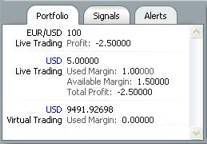
In this example you can see the transaction of EUR/USD with 100 quantity is get the profit -2.50000 (US Dollars) in Live Trading, that mean this transaction is in loss position.
From total deposit of 5.00000 US Dollars,
Live Trading using 1.00000 US Dollars margin (100 quantity),
with the available margin is 1,50000 US Dollars (150 quantity),
get total of profit -2,50000 US Dollars (250 quantity).
That mean you get -250 pips loss position.
If your position is not increased and become more loss until -395 pips, that mean your margin is under 1% of total availability. And your transaction will be closed automatically by Marketiva, this window that called Margin Call will pop up.
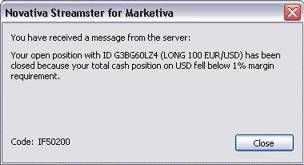
Keep record your trading development in this month, and if you fell that your skill is increased, become more expert than before and can make the $5 bonus money greater, so this is the right time to add your deposit money, please open the next page.
Previous
Read More
Add your Comment
Step Five: How to add Deposit Fund
After you can get money from your forex trading, now you can get more profit by adding more deposit fund, so you can allocate more quantity on your transaction.
The procedure to add Deposit Fund:
You must have Liberty Reserve account to transfer the money to your Marketiva account, if you don't have Liberty Reserve account yet, please go to Liberty Reserve and create an account button to signup. Signup free Liberty Reserve account here..
If you already have Liberty Reserve account, you can enter the Deposit Fund. Click Account Center then click on Deposit Funds menu..

After that, on the next page you must click on Liberty Reserve logo to choose deposit your account by Liberty Reserve.
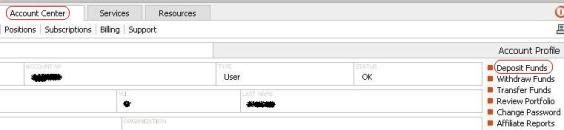
Payment form will be appear, fill in all the boxes completely:
And then just follow the instruction..
The Deposit Fund transfer process is finish; you can see the money added on Portfolio windows on Streamster software.
Now you can get more profit from your Forex trading, keep on your trading track, don't be greedy to get much profit on one transaction, keep warning on the news development, and always put SL on each of your transaction.
If you have much money from your Forex trading, and you want to withdraw money from your Marketiva account, please open next page.
Step Six: How To Withdraw Your Money
Read More
Add your Comment
Step Six: How to Withdraw Your Money
Important: Marketiva Drops E-gold Completely
To withdraw your account please follows these procedures :
First of all, you must transfer your fund to Default Desk.
Click on Account Center and click on Transfer Funds menu.
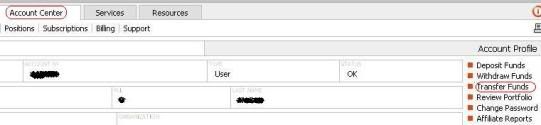
You must do this Transfer Fund procedure because you only can withdraw the money from Default Desk, transferred to your Liberty Reserve account.
Enter the amount of money you want withdraw in Amount box, if you want withdraw $100 then you must fill it with 107, because you must added the $7 fee for transaction using Liberty Reserve.
Click on Transfer button, and click on Confirm Transfer button on the next page.
Your funds transfer has been successfully processed
The selected funds transfer has been successfully processed and a detailed transaction profile has been created in our database. If you need any additional information or clarification regarding the transaction processed, please contact us by visiting the following contact page:
After your Default Desk is filled, now you can withdraw it to your Liberty Reserve account. You can click on Account Center and click on Withdraw Funds menu.
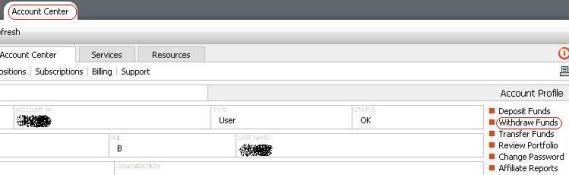
After that, on the next page you must click on e-gold logo to choose withdraw your account by Liberty Reserve.

Withdrawal form will be appearing, fill in all the boxes completely:
Fill in with your Liberty Reserve account
Fill in with your name
Enter the amount that you want withdraw
The number that filled in the Amount box is the amount of fund you want withdraw, Marketiva will added with $7 fee for Liberty Reserve transfer, if you fill the Amount box with 100 then your Default Desk will debited by $107, and your Liberty Reserve account will be transferred by $100.
If you choose to withdraw all exiting fund then you must emptying the Amount box, and click on the little box below.
Click on little box (√) on Remember this data... to make your data automatically filled on the next form, so you mustn't enter it again.
Click on Withdraw Funds button, and confirmation page will be appear. Click on Confirm button if you agree with that confirmation.
Your withdrawal transaction has been successfully processed
The selected withdrawal transaction has been successfully processed and a detailed transaction profile has been created in our database. If you need any additional information or clarification regarding the transaction processed, please contact us by visiting the following contact page:
The Withdraw Fund transfer process is finish, you must wait until Marketiva staff processed your transaction in less than 24 hours on working days, this process is not automatic because Marketiva want to protect your account and make sure that transaction is doing by appropriate person.
This is the end of The Forex Tutorial for Beginner in my blog, please enjoy the Forex trading and get much profit, thank you for all of your attention.
Previous
Read More
Add your Comment
Forex History
The Gold Exchange and the Bretton Woods Agreement
In 1967, a Chicago bank refused a college professor by the name of Milton Friedman a loan in pound sterling because he had intended to use the funds to short the British currency. Friedman, who had perceived sterling to be priced too high against the dollar, wanted to sell the currency, then later buy it back to repay the bank after the currency declined, thus pocketing a quick profit. The bank’s refusal to grant the loan was due to the Bretton Woods Agreement, established twenty years earlier, which fixed national currencies against the dollar, and set the dollar at a rate of $35 per ounce of gold.
The Bretton Woods Agreement, set up in 1944, aimed at installing international monetary stability by preventing money from fleeing across nations, and restricting speculation in the world currencies. Prior to the Agreement, the gold exchange standard--prevailing between 1876 and World War I--dominated the international economic system. Under the gold exchange, currencies gained a new phase of stability as they were backed by the price of gold. It abolished the age-old practice used by kings and rulers of arbitrarily debasing money and triggering inflation.
But the gold exchange standard didn’t lack faults. As an economy strengthened, it would import heavily from abroad until it ran down its gold reserves required to back its money; consequently, the money supply would shrink, interest rates rose and economic activity slowed to the extent of recession. Ultimately, prices of goods had hit bottom, appearing attractive to other nations, who would rush into buying sprees that injected the economy with gold until it increased its money supply, and drive down interest rates and recreate wealth into the economy. Such boom-bust patterns prevailed throughout the gold standard until the outbreak of World War I interrupted trade flows and the free movement of gold.
After the Wars, the Bretton Woods Agreement was founded, where participating countries agreed to try and maintain the value of their currency with a narrow margin against the dollar and a corresponding rate of gold as needed. Countries were prohibited from devaluing their currencies to their trade advantage and were only allowed to do so for devaluations of less than 10%. Into the 1950s, the ever-expanding volume of international trade led to massive movements of capital generated by post-war construction. That destabilized foreign exchange rates as setup in Bretton Woods.
The Agreement was finally abandoned in 1971, and the US dollar would no longer be convertible into gold. By 1973, currencies of major industrialized nations floated more freely, as they were controlled mainly by the forces of supply and demand. Prices were floated daily, with volumes, speed and price volatility all increasing throughout the 1970s, giving rise to new financial instruments, market deregulation and trade liberalization.
In the 1980s, cross-border capital movements accelerated with the advent of computers and technology, extending market continuum through Asian, European and American time zones. Transactions in foreign exchange rocketed from about $70 billion a day in the 1980s, to more than $1.5 trillion a day two decades later.
A major catalyst to the acceleration of Forex trading was the rapid development of the eurodollar market; where US dollars are deposited in banks outside the US. Similarly, Euromarkets are those where assets are deposited outside the currency of origin. The Eurodollar market first came into being in the 1950s when Russia’s oil revenue-- all in dollars -- was deposited outside the US in fear of being frozen by US regulators. That gave rise to a vast offshore pool of dollars outside the control of US authorities. The US government imposed laws to restrict dollar lending to foreigners. Euromarkets were particularly attractive because they had far less regulations and offered higher yields. From the late 1980s onwards, US companies began to borrow offshore, finding Euromarkets a beneficial center for holding excess liquidity, providing short-term loans and financing imports and exports.
London was, and remains the principal offshore market. In the 1980s, it became the key center in the Eurodollar market when British banks began lending dollars as an alternative to pounds in order to maintain their leading position in global finance. London’s convenient geographical location (operating during Asian and American markets) is also instrumental in preserving its dominance in the Euromarket.
Read More
Add your Comment
Create E-Gold Account
How To Use E-Gold?
What is e-gold?
Why e-gold?
E-gold is safe
How to open e-gold account
Click this link to open e-gold registration website :
On first page click on CREATE AN ACCOUNT. Then click on I AGREE button.
The "New e-gold™ Account Creation Form" page will be appearing, fill in your data here :
1. Account Name
Specify a name for your account. The account name will be displayed when someone is spending or receiving e-metal to this account. An optional description may be entered.Example :
*Robert Barry (For Marketiva, you must put your real name)
You may leave the Description and Additional Description empty.
2. User Name
Specify a user name for yourself. The user name will be displayed in the account history, to clarify one account user from another. Currently a single user is supported per account. You may also enter a description of the user if desired.
Example :
*Robert Barry
You may leave the Description and Additional Description empty.
3. Point of Contact
Specify the account point of contact information, this must be the name and address of a real person, fill in with your real data and complete mailing address.
Name : fill in with your real name
Address : fill in with your full address
City : fill in with your City
State/Province : fill in with your State or Province
Country/ZIP/Postal Code : fill in with your Country and ZIP/Postal Code
E-mail : fill in with your e-mail address that still active and the inbox is not full.
Tips : You can create new e-mail for your internet business, different from your private e-mail (get free e-mail such as from.
Phone : fill in with your Phone Number, you can use home phone or cellular phone that still active, fill it with complete country and area code (example : +6221XXXXXXX).
This is important if you lost your passphrase or can not access your e-mail to login, the e-gold staff will contact you via this telephone number.
Fax : You can empty it if don't have fax machine.Alternate Passphrase : Fill in with alternate passphrase, this is for Payment verification use, you can use different passphrase than the main passphrase.
Attention : You must remember your passphrase, don't use usual word that can be guest by other, use combination of letter, number and special character/symbol, and with combination of big and small letter. Make passphrase as long as you can, make it difficult to crack. Don't give your passphrase to other in any reason; don't believe the e-mail that asks your passphrase, e-gold is never send e-mail like this.
4. Passphrase
New e-gold Account Passphrase : Fill in with your desired passphrase, 6 letter minimum and must be combined with letter and number (example : mY1ph2A3sS4Wor5D). Don't use same password from other website.
New e-gold Account Passphrase again : Fill in with your passphrase again.
Tips : To protect your passphrase from other bad guy, that maybe use keylogger or spyware on your computer, please always use this SRK facility, your keyboard keystroke will not recorded and can be read by other person. Click on SRK logo here and the virtual keypad will appear :


5. Turing Number Entry

Enter the sequence of random numbers displayed in the above grid :
This is for more protection of your login and to avoid automatic login by software, enter the number on image (example : 564677).
Attention : This is not your e-gold account number, your new account number will be emailed to you. Enter the sequence of random numbers displayed in the above grid:
Click on Open button and will displayed this page :
Your new e-gold Account Number has been sent to : your-email@xxxxxxx.com
You will accept e-mail from e-gold, your e-gold account number is in this e-mail and now you ready to use e-gold for your internet money transaction.
Attention : For Hotmail, Yahoo and some of other e-mail provider user please check your Bulk or Junk e-mail folder, maybe your e-gold letter is there.
How to use e-gold account
Open e-gold website and click "Access Your Account"
In login page please enter :
Account Number : Enter your e-gold account number (that accepted from e-mail).
Passphrase : enter your Passphrase, please always using SRK keypad (click on SRK logo).
Turing Number : Enter the number from image.
Tips : If you can't see the image, or you waiting to long for entering the number, please click refresh on your browser to change with the new image number.
Click on Login button, and you will enter the Member Area Page.
Member Area
There are six buttons for your e-gold activity :

Logout : To logout your e-gold account
Attention : You must click Logout after finished your e-gold activity, don't leave it open, don't close your browser or turn off your computer before logout from e-gold website.

E-metal : It is the type of your saving, you can choose from e-gold, e-silver, e-platinum or e-palladium, but usually we use e-gold, the price of these e-metals is difference.
Weight : It is the weight of your saving (oz. troy), your e-gold saving is based on weight of your e-metal and your money value will be change if the price of the e-metal is changing.
Equiv. grams : It is the weight in gram, because some country use gram rather than oz. troy.(1 oz. troy equal to 31.1 grams).
Current Value in (USD - US$) : It is your saving in US Dollar price, you can use other money currency here.
Your Money value in US Dollar will be changing every time, depend on the price of e-metal you use, if you use e-gold and the gold price is up then your US Dollar value will be up too, vice versa.
Spend : To transfer money to other e-gold account.

Pay : Fill in with e-gold account that you want to spend.
Amount : Enter the amount of money you want spend, choose "US Dollars worth" of "Gold"
Memo : Enter your message to the receiver.
Then click Preview.
The Preview page will appear, check the data and click on Confirm.

If the transaction is success will you will see this page :

Please write and save the Batch number for confirm to the receiver.
History : To see the detail transaction you're made in e-gold.

Choose the Starting Date and Ending Date, you can see the transaction with these categories included :
Payment Received : Your received money.
Payment Made : Your spend money
And other options you can choose.
Click on View Detailed History to see in detail, or View Summary to see in total only.
Account Info : To see your account detail, and to change your data.
If you use different computer to open your e-gold account
If you use different computer, such as from home and office, you need to enter the AccSent PIN.

Example of the e-mail :
PIN : 262-904 ◄ the PIN number
Acct: xxxxxxx ◄ your e-gold account number
Expires : 8/20/2005 2:58:00 AM GMT ◄ the expired date of the PIN (GMT time)
IP : xxx.xxx.xxx.xxx ◄ your IP Address
Funding your E-gold
Now when you have your account set up, you have to fund your account with gold in order to be able to make payments. To do this you need to use an Exchange Service which will convert your money into E-gold. We recommend the following Exchange Services :

GoldEx - Buy e-gold with Credit Card/Wire Transfer/Local Bank
Mynetgold.com
Wannagold.com
Related Articles
Do You Have A Problems With Your Egold Account?
Read More
Add your Comment
ProForex Blog Awarded!
I am happy to announce you that my blog was chosen as one of the top 25 forex blogs on the net! Here is the permalink to the site that awarded my blog www.forexreader.com
My blog is placed as number 12 i think it is reasonable position as it wasn't often updated besides blogs that higher then i am, are the ones that i have learned from, so i advice you to check them out.
What else can i say? This award motivated me to continue this blog with even more interesting forex informations. I will soon write very interesting article on entering and exiting trades. I have got new trading strategy that produces steady results for USD/JPY it will be also published soon.
I will also write some articles on Automated Trading with MetaTrader, i will mainly focus on script and ExpertAdvisors, because as you already know i do not really use indicators. More over i will try to show you how to detect patterns on charts and translate thse patterns into ExpertAdvisor code.
I was also thinking of buying domain and placing there my best articles, it would be good to have those articles available within a click of a mouse, don't you think?
Read More
Add your Comment
E-gold Safety Measures - What makes egold secure?
"I saw a very interesting survey two years ago. 20 cases of "stolen funds" from e-Gold were actually thoroughly investigated. And do you know what they found?
In EVERY SINGLE CASE the owners of the accounts had given away their password!
By "giving their passwords away" they were referring to things like unprotected computers that had keyloggers and trojans (in other words, by NOT protecting their computers, they had, in effect, "given away" their details).
Also on the list were..
- Using public computers,
- Having the same password for forums and programs they had joined as for their e-Gold account,
- Having full details of their accounts and passwords stored unencrypted on their computers (like in a Word or .txt document) etc.
Again, in every single case that was investigated, it was found that those that had their accounts hacked into had somehow "given" their details away!
Never...
For your security, never click on an e-gold link in an email. It's too easy for thieves to make it look like it's going to www.e-gold.com when it's really linked to another site... owned by someone who wants to steal your login information and your e-gold funds.
O.K. Now to answer your question!
What makes e-gold so secure now?
As you more than likely know, e-Gold has the facility to use an extremely long and complicated password, like :
tHa*/359£fDst90=$%vD
Then, they have the Secure Randomized Keypad facility to enter your Passphrase. Use the SRK in case your computer is infected with a keystroke logger or virus. It's the blue circle..

They also have Turing numbers which expire quickly. (If that happens, you need to refresh the login page to get a new Turing number.)
Several months ago, they introduced a "Computer ID" system. That means, if anybody tried to log into your account from a different computer, they are refused.
In order to get into the account, e-gold immediately sends a one-time 6 digit PIN to your own, personal e-mail address. This is valid for 15 minutes only. You have to use that PIN to enter into your account. This protects you if, say, you buy a new computer, but prevents other people getting into your account if they use a different computer.
E-Gold now also have an IP recognition system whereby the IP you are registered with is recognised, and if different, again you have to enter a special PIN which is sent only to your personal e-mail addy. This is good news if, for example, you change your ISP, but bad news for hackers who are using a different computer and/or ISP.
Finally, e-Gold has recently switched their own IP to that of Prolexic, the professional anti-hacker/DDOS providers.
While it would be unwise to use words like "impossible" ... with their present set up it is now ALMOST impossible for a hacker to get into your account (unless, of course, they are using the same computer, the same IP, have access to your personal e-mail, and you have "given away" your details through sheer ignorance or stupidity)."
My own experience when I lost my egold password
Several years ago, I hadn't used my egold account for a long while and had probably changed computers in the interval. And I couldnt find my egold login details. So I contacted egold and had to wait for their letter to reach me here in Australia with a new password. As frustrating as that was, egold had protected my account. Now I keep better records in an encrypted form in a nifty piece of software called Roboform but it does illustrate another aspect of e-gold's security system.
Cost of e-gold
Incidentally e-gold is also cheap to use. We moved US$500 from one e-gold account to another and the fees were only 80 cents.
RISK NOTICE: In any business and in any investment, there is a degree of risk. If you play big, you can win big - or lose big. So if you cant afford to lose money, you should NOT participate.
DISCLAIMER: People who participate in any program, project, business, or venture described at this site do so entirely at their own risk. Participants agree to hold the owners and associates of ThisPaysBIG.com harmless in respect of any losses incurred as a result of their decision to participate. Nothing at this site is to be interpreted as legal, accounting, tax, currency, banking, or investment advice. Anyone seeking such advice should consult a properly qualified and accredited professional. Readers of this site are urged to obey all relevant laws. Any comments regarding participation in any opportunities featured here are void where prohibited by local laws.
Related Articles
Do You Have A Problems With Your Egold Account?
Read More
Add your Comment
What is Marketiva?
With its flexible quantity specifications and $5 cash reward, Marketiva allows you to start trading with no money down. Due to strict lot specifications, many other over-the-counter market makers require at least $500 to start with.
What is Marketiva?
With more than 180,000 serviced users, 110,000 unique and live trading accounts, and more than 2.3 million live orders executed each month, Marketiva is one of the most popular over-the-counter market makers in the world.
May I open a test account and try the system first?
Because live and virtual trading desks coexist within one Marketiva account,you may try our system with a regular account and later use the same account for live trading. In any case, you can open your Marketiva account for free!
How much money do I need to start trading right now?
With its flexible quantity specifications and $5 cash reward, Marketiva allows you to start trading with no money down. Due to strict lot specifications, many other over-the-counter market makers require at least $500 to start with.
Start Trading Forex With as Little as $1.00! It's easy, takes only 5 minutes, and you even earn $5 cash reward!
 Read More
Add your Comment
Read More
Add your Comment
Marketiva platform update
Well they updated their platform few months ago, but i didn't wrote about, mainly because i doubt anyone is using marketiva for charting. But in my Marketiva review i wrote their trading platform lacks functionality such as trendlines, support, resistance lines, fibonacci retracement, etc.
So now they have all of mentioned above tools, although i still do not like their interface which is not user friendly, but this is only my opinion, some of you will probably do not agree with this.
If you would like to read my last marketiva review then here is the link.
Read More
Add your Comment
Five Key Factors that Move the Forex Markets -- and How to Profit from Them
Key Factor 1. Interest Rates.
We use two methods to profit from the difference in countries' interest rates:
- interest income
- capital appreciation
Generating interest income.
Every currency in the world comes attached with an interest rate that is set by its country’s central bank. All things being equal, you should always buy currencies from countries with high-interest rates and finance these purchases with currency from countries with low-interest rates.
For example, as of the fall of 2006, interest rates in the United States stood at 5.25%, while rates in Japan were set at .25%. You could have taken advantage of this rate difference by borrowing a large sum of Japanese yen, exchanging it for US dollars, and using the US dollars to purchase bonds or CDs at the US 5.25% rate. In other words, you could have borrowed money at .25%, lent it out at 5.25%, and made a 5% return. Or you could save yourself all the hassle of becoming a money lender by simply trading the currency pair to affect the same transaction.
Generating income from capital appreciation.
As a country's interest rate rises, the value of the country's currency also tends to rise -- this phenomenon gives you a chance to profit from your currency's increased value, or capital appreciation.
In the case of the USD/JPY spread in 2005 and 2006, as the US interest rates stayed higher than Japan's, the dollar continued to increase in value. Investors who traded yen for dollars gained from interest income (as explained in the section above) as well as the US dollar's capital appreciation.

Figure 1-1. Between January 2005 and November 2006, as the spread between US and Japanese interest rates widened, so did the spread between the currency values. A wide spread in currency values provides investors with a ripe opportunity to earn income through both interest income and capital appreciation.
Interest Rates Spark a 700 Point Rally
Another great example of the power of interest rates in the currency market occurred in August of 2006. At that time, the Bank of England surprised the market by raising its short-term rates from 4.5% to 4.75%. Interest rates for Japan were still at a low .25%.
The rise in England's interest rates widened the interest rate differential on the popular GBP/JPY cross from 425 basis points to 450 basis points. Investment money flowed into Great Britain as traders bought up pounds to take advantage of the new spread. As the demand for the GBP increased, the value of the GBP increased, and the spread between the currencies increased. This domino effect lead to a 700-point rally in the GBP/JPY over the next three weeks.

Figure 1-2. When the Bank of England raised short-term interest rates in August 2006, it lead to a 700-point rally in the GBP/JPY over the next three weeks.
80 Points in Less than 24 Hours
More recently, we have used interest rate differentials to successfully predict several profitable trades for Forex Advisor members.
The concept of interest rates can be used to trade currencies using both long- and short-term perspectives. On a long-term basis, we look for major themes. On a short-term basis, we look for surprises in the news that shift the market’s interest rate expectations. We were able to make two winning trades based on short-term interest rate flows in the Australian dollar/Japanese yen (AUD/JPY) currency pair on January 24, 2007.
The trigger for our trade was the surprise drop in Australian consumer prices during the fourth quarter. The market was looking for hot inflation numbers but instead they received cold ones. Low inflation numbers meant the central bank of Australia was not likely to raise interest rates as expected. This news sent the Australian dollar tumbling hard against the Japanese yen, as traders speculated that the interest rate differential between the two currencies would no longer grow.
The first trade we made on January 24 banked us 45 points. We took profit before the currency pair retraced and then sold it again when it showed further signs of weakness. The second January 24 trade produced an additional 35 points for a total of 80 points.

Australian dollar vs. Japanese yen, January 24, 2007. By predicting the affect of unexpectedly low inflation on the Australian dollar, we made two winning trades on January 24. Combined, these trades netted us 80 points in one day.
..and How to Profit from Them!
1.Interest Rates 2.Economic Growth 3.Geo-Politics
4.Trade and Capital Flows 5.Mergers and Acquisitions
Read More
Add your Comment
Five Key Factors that Move the Forex Markets -- and How to Profit from Them
Key Factor 2. Economic Growth.
The next factor you need to consider when predicting a country's currency movements is its economic growth. The stronger the economy, the greater the possibility that the central bank will raise its interest rates to tame the growth of inflation. And the higher a country's interest rates, the bigger the likelihood that foreign investors will invest in a country's financial markets. More foreign investors means a greater demand for the country's currency. A greater demand results in an increase in a currency's value. Hence, a ripple effect: economic growth inspires higher interest rates inspires more foreign investment inspires greater currency demand which inspires an increase in the currency's value.
How Anemic Economic Growth Crashed EUR/USD 2,000 Points
For a good example of the impact of economic growth on the direction of currency rates, let’s look at the EUR/USD from 2005 to 2006. Economic growth is best measured by a country's Gross Domestic Product, or GDP. The United States and Eurozone represent two of the most prosperous regions in the world with GDPs running at $13 trillion and $11 trillion respectively.
In 2005 and 2006, the difference in growth rates between the two major economic powers was clearly reflected in currency movements. In 2005, the Eurozone lagged significantly behind the United States in economic growth, averaging an anemic 1.5% rate throughout the year while the US expanded at a healthy 3% rate. Consequently, investment capital flowed from Europe to the US and the EUR/USD dropped by nearly 2,000 basis points by the end of 2005. In 2006, however, Eurozone growth perked up while US growth began to slow. At the end of 2006, Eurozone GDP actually overtook US growth rates, causing the EUR/USD to rally.

In 2005, The EUR/USD plummeted as Eurozone showed little economic growth compared to the US GDP. In 2006, as the EZ GDP rallied, so did the EUR/USD.
We've used GDP's to forecast trends on several more Forex trades in the last months. One great example is our November 14, 2006, United States dollar/ Japanese yen trade (USD/JPY).
67 Points in Four Hours
In the middle of November 2006, hurt by the contraction in its housing sector, the US economic data began to deteriorate. Rumor had it that the US might lower interest rates in the first quarter of 2007, which would encourage foreign investors to look elsewhere.
Meanwhile, the Japanese economy was buoyed by the weak yen that made Japanese products affordable internationally and helped spur double digit growth in exports. On November 14, 2006, the Japanese GDP printed at much better than expected -- 2% versus the 1% forecast. We decided to take advantage of the strength of the Japanese economic growth vs. the relatively weak economic outlook in the US, so we went short USD/JPY at 117.82. As we hoped, that morning, in sharp contrast to Japan, US retail sales produced very weak numbers and the USD/JPY pair collapsed. We were able to collect 67 points on the trade in less than four hours.

United States dollar vs. Japanese yen, November 14, 2006. The strong economic growth in Japan made the USD/JPY trade a success for us in November.
..and How to Profit from Them!
1.Interest Rates 2.Economic Growth 3.Geo-Politics
4.Trade and Capital Flows 5.Mergers and Acquisitions
Read More
Add your Comment
Five Key Factors that Move the Forex Markets -- and How to Profit from Them
Key Factor 3. Geo-Politics.
Do you hate the business section? Do your eyes glaze over at the mere mention of economic data and mind-numbing accounting numbers? Fear not. The currency market is the only market in the world that can be successfully traded on political news as well as economic releases. Because currencies represent countries rather than companies, they are political as well as economic assets and are therefore very responsive to any disturbance in the political landscape.
The key to understanding speculative behavior with respect to any geopolitical unrest is that speculators run first and ask questions later. In other words, whenever investors fear any threat to their capital, they will quickly retreat to the sidelines until they are certain that the political risk has disappeared. Therefore, the general rule of thumb in the currency market is that politics almost always trumps economics. The history of FX is littered with examples of political trades. Let’s take a look at some examples over the past few years.
No-Confidence Vote Depresses Loonie
The end of May 2005 was not a happy time for the Liberal Party government of Canada’s Prime Minister, Paul Martin. After having guided the country to its best economic performance in 30 years, Martin was facing the fight of his life as his party prepared for a no-confidence vote stemming from accusations of past Liberal Party corruption.
Meanwhile, Canada’s economy was becoming a star performer, spurred by the massive rises in the price of oil. As the number one exporter of crude to the US, Canada was benefiting mightily from this newfound wealth. Yet despite the great economic news, the Canadian dollar remained weak against the greenback as traders worried about the implications of the fall of the Liberals.
On May 26, 2005, Martin’s government survived the no-confidence vote and the Canadian dollar rallied, causing the USD/CAD* to plunge 200 points in less than a week as the market once again focused on Canada’s stellar economic fundamentals.
*The USD/CAD pair trades inversely.

Despite strong economic performance, the Canadian dollar remained weak until Martin survived the no-confidence vote and the Canadian political climate settled.
BoJ Governor Fukui Responsible for Floundering Yen
At the beginning of June 2006, Bank of Japan Governor Fukui revealed to the Diet that he had invested 10 million yen in 1999 in a fund founded by financier Yoshiaki Murakami. Murakami was later indicted on charges of insider trading and although Fukui was not involved in any illegal activity, the mere appearance of impropriety in image-conscious Japan greatly damaged his reputation.
As the principal of Japan’s monetary policy during its recovery from a decade-long battle with deflation, Fukui was considered one of the most powerful men in the currency markets. His forced resignation would do great damage to the prospects of further recovery in Japan.
Meanwhile, Japanese economic data continued to show stellar economic performance as exports and business investment continued to grow, unemployment reached decade-long lows, and consumer sentiment improved. Talk spread through the markets that Japan would soon abandon its zero-interest rate policy and would actually have positive interest rates for the first time this century.
Despite all the positive speculation, the yen floundered, continuing to decline against the dollar as traders feared that Fukui would have to step down. Fukui stolidly refused, and as the furor passed and the market realized that he would stay on, the yen’s strength returned, showing once again that when it comes to currencies, politics can often be more important than economics.

Despite positive speculation and strong economic reports, the Japanese yen did not regain strength until investors realized that Fukui would not resign.
If you enjoy predicting changes to the political landscape, your talents could be well utilized as a Forex trader. Recently, we predicted a strengthening of the Canadian dollar and earned close to 70 points in less than 24 hours. At 10 to 1 leverage you could have profited along with us, making a 7% return or $700 on a $10,000 trade.
How OPEC Made Us 70 Points
Geopolitical risk can mean wars, terrorist attacks, or missile launches, but it can also relate to milder yet still politically powerful events such as G7 meetings and OPEC announcements. In October 2006, Saudi Arabia announced that they would back OPEC’s plans to cut oil production by one million barrels a day after oil prices dropped more than 10% in just seven trading days. The cuts were to take effect on November 1, 2006, with more to come in December.
As Canada is a major exporter and producer of oil, we believed that this policy change would be very positive for the Canadian dollar. Therefore we went short the US dollar and long the Canadian on October 19, 2006. Over the next 24 hours, based upon the geopolitical theme, we earned close to 70 points on the trade.

United States dollar vs. Canadian dollar, October 19, 2006. Knowing that OPEC's announcement would affect Canadian currency allowed us to gain 70 points on October 19.
..and How to Profit from Them!
1.Interest Rates 2.Economic Growth 3.Geo-Politics
4.Trade and Capital Flows 5.Mergers and Acquisitions
Read More
Add your Comment
 Previous Article